Previous Post
New Writing Style Controls for Listing Descriptions
Next Post

ListingAI has always scanned every description for wording that could create Fair Housing risk and suggested compliant alternatives. Until now, you reviewed every single flag yourself, on every single listing — even when it was the same kind of flag, with the same decision, for the hundredth time.
Today that changes. You can now teach ListingAI how you handle each kind of compliance risk — and it will apply your decisions automatically from then on.
Review a flag, keep your wording or apply the suggested rewrite — and from today, tell ListingAI to handle that kind of risk the same way every time.
We analyzed over 300,000 real compliance flags raised on listings across the US and Canada and organized every one of them into clear categories. When ListingAI flags a sentence, you now see exactly which kind of risk it found — and that category is what your rules attach to. Here's what we flag, with real examples of the wording that triggers each:
| Category | What triggers it |
|---|---|
| Ability wording | "Step into the foyer," "walking distance to shops," "a short stroll to the beach" — phrasing that assumes physical ability |
| Family references | "Perfect for young families," "kid-friendly street," "room to grow your family" |
| Lifestyle & buyer assumptions | "Ideal for entertainers," "suits busy professionals," "perfect for first-time buyers" — describing who should live there instead of the property |
| Age references | "Empty nesters," "ideal for retirees," "young professionals will love it" |
| Race, religion & origin | References to community character, culture, or proximity framed around religious or ethnic institutions |
| Steering & exclusivity | "Prestigious enclave," "exclusive neighborhood," "highly desirable area" |
| Income & financial status | Wording aimed at a buyer's finances rather than the home — "perfect for buyers on a budget" |
| Health & disability | References to health conditions or disabilities |
| Gender & orientation | Wording that assumes the buyer's gender or orientation |
| School references | "Top-rated school district" framing that can function as steering |
| Safety & crime | "Safe neighborhood," "secure area" — implied comparisons that carry steering risk |
| Measurement accuracy | Units or measurements that don't match the property's locality |
| Other wording risks | Anything that doesn't fit a category above |
A surprising finding from that analysis: ability wording alone accounts for more than half of every compliance flag we've ever raised. Phrases like "step into" and "walking distance" are baked so deeply into real estate writing that most agents never notice them. If you only ever set up one rule, make it that one.
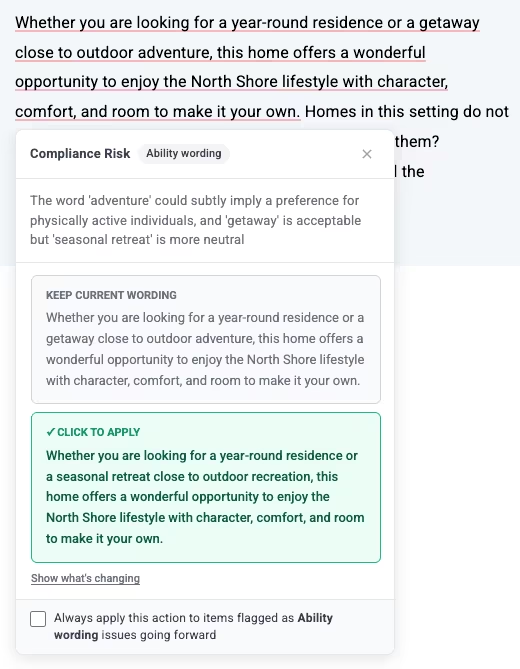
When ListingAI flags a sentence, you see your current wording and the suggested rewrite side by side. For example:
Your wording: "Step into this sun-drenched foyer, just a short walk to shops and cafes."
Suggested: "The sun-drenched foyer welcomes you, with shops and cafes nearby."
One click keeps your wording, one click applies the fix — and a "Show what's changing" view highlights exactly which words were removed and added, so you're never guessing what the AI touched.
Under every flag there's a new checkbox: "Always apply this action to items flagged as [category] issues going forward." Tick it, then make your choice:

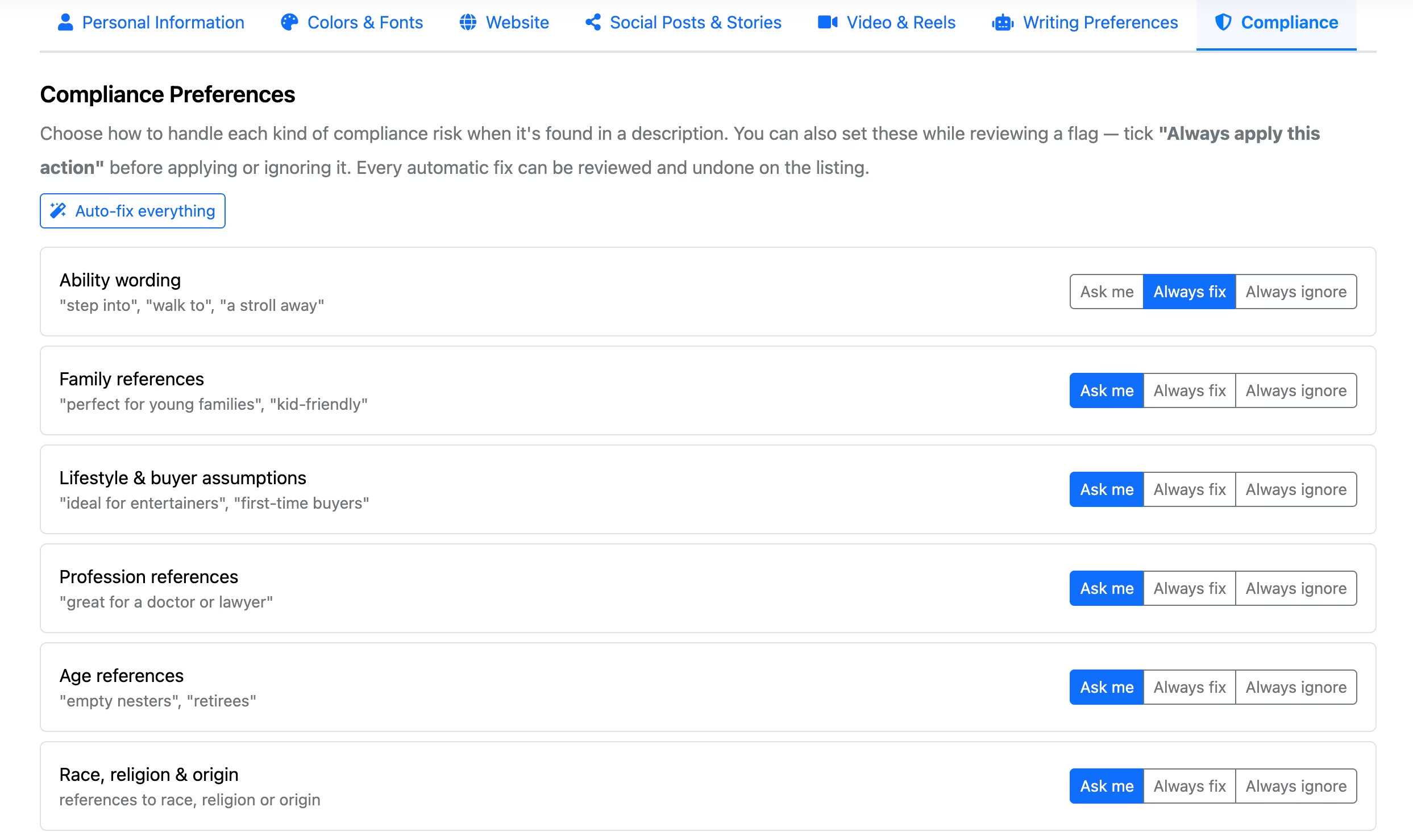
Prefer zero interruptions? There's an Auto-fix everything button that applies our suggested wording for every category automatically. Your descriptions come out clean, every time, with no review step at all.
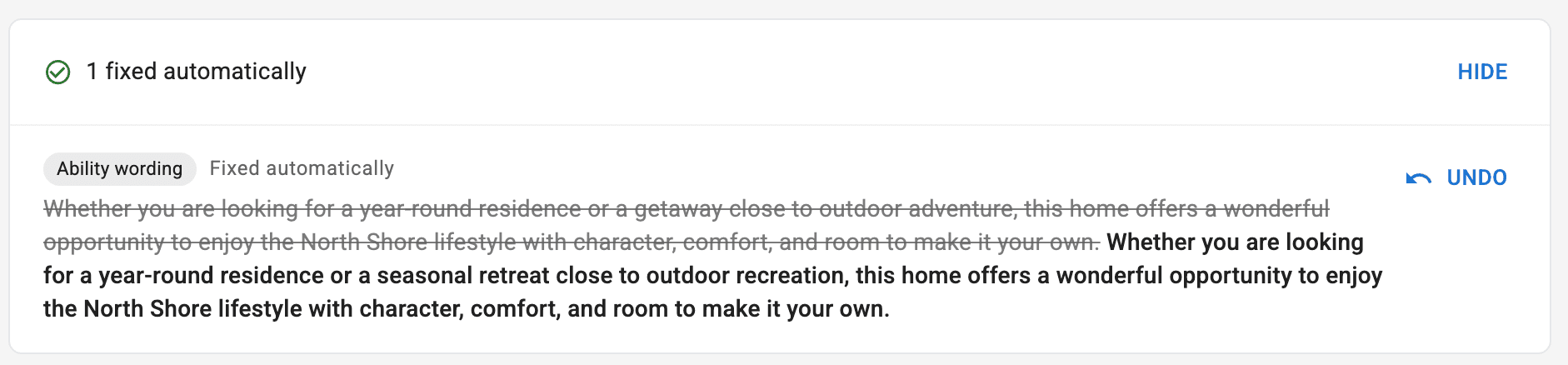
Anything handled by your rules is reported right on the listing: a summary line like "2 fixed automatically · 1 ignored by your rules" sits at the top of the compliance panel, expandable to show the exact before-and-after wording of every automatic change — each with a one-click Undo. Automatic never means invisible.
Here's the part teams and assistants will love: compliance rules live on your branding profiles, right alongside each agent's name, colors, and writing style. If you manage listings for several agents from one account, each branding profile carries its own compliance preferences — and every listing follows the rules of the profile it was created with.
One agent wants every fix applied automatically. Another wants to personally review anything touching family references. A third works in a market where ability wording is standard practice and just wants it ignored. Set each profile once under Branding → Compliance: every category gets a simple three-way choice — Ask me, Always fix, or Always ignore.
Fair Housing regulations vary by region, and our suggestions are never a substitute for your professional judgment. That's exactly why these are your rules: ListingAI only auto-applies or ignores what you've explicitly decided is right for your market.
Compliance Rules are live now for all ListingAI users. Write a description and try them today.
© 2026 MappedBy Inc. All Rights Reserved